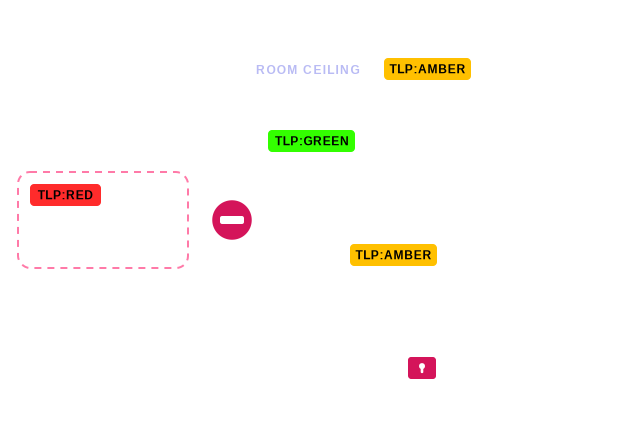
Security Labeling lets a sender mark a message with a handling label, and lets a room refuse content it is not accredited to carry. The label travels inside the end-to-end encrypted message, signed by the sender, where the server cannot read it.
Most disclosures are mistakes: the wrong file in the wrong room, or the wrong person added to a thread. Security Labeling is built to catch those mistakes before content leaves the sender’s device.
How Security Labeling works
- A sender chooses a marking. The app builds the banner from the marking scheme, so nobody types it by hand. Readers see the banner above and below the message.
- Parts of a message can carry their own marking. An attachment can be marked more strictly than the text it comes with. The attachment’s label is sealed inside its encrypted file.
- A room is accredited for a set of markings. The accreditation is a ceiling. The room accepts a message only if it is accredited for every label on it, including attachments.
- An enforced room vets its members. Security officers keep attribute records for each person. An enforced room admits only people whose records meet the room’s requirements, and it removes anyone who stops qualifying.
- Every decision leaves evidence. Admissions, refusals, and removals go into a tamper-evident log that holds hashes and no message content.
Three levels of control
| Room type | What the marking does |
|---|---|
| Marked only | Shows the banner. The app tells everyone that markings are for information and are not enforced. |
| Accredited | Refuses content the room is not accredited for, when sending and on receipt. |
| Enforced | Adds membership vetting: every member is checked against the organization’s records and removed if they stop qualifying. |
A room’s security settings are fixed when the room is created. To change them, the app creates a new room with the same members, so nobody is moved into a different level of control without seeing it.
Marking schemes included
| Scheme | What it covers |
|---|---|
| Controlled Unclassified Information (CUI) | Categories from the NARA CUI Registry, with limited dissemination controls such as NOFORN and REL TO. |
| Traffic Light Protocol (TLP) 2.0 | The five FIRST levels: TLP:RED, TLP:AMBER+STRICT, TLP:AMBER, TLP:GREEN, and TLP:CLEAR. |
| TLP with legal and financial markings | The TLP levels plus Privileged, Work Product, FRE 408, Without Prejudice, MNPI, and dissemination-list-only (DL ONLY). |
An organization can show its own name for a label beside the standard marking, for example “Internal · TLP:AMBER+STRICT”.
A message with no label displays as “Unmarked”. Cyfer never treats an unmarked message as cleared for release.
How labels work with end-to-end encryption
The marking is part of the encrypted message. The sender’s signature covers it, so it cannot be stripped or altered in transit, and the server never sees it. Each app checks content against the room’s accreditation itself, at the moment of encryption and again on receipt.
Room membership rules are different. Both the apps and the server enforce them, so the server can see a room’s policy but not the labels on the messages inside it.
The label model follows the structure of NATO STANAG 4774 and 4778: a policy, one hierarchical classification, and sets of category tags.
What Security Labeling does not do
- It does not block screenshots, copying, or photographs of a screen.
- It does not add watermarks.
- It does not let anyone downgrade or relabel a message after it is sent. An edited message keeps its original label.
- It guards against accidental disclosure. It is not a defense against a determined insider.
Who it is for
- Law firms that mark privileged material and screen lawyers from matters.
- Financial firms that restrict deal rooms to named people and keep a record of every admission.
- Government agencies and suppliers that handle Controlled Unclassified Information.